0-Click Wiretapping Bluetooth Headphones
Jan 9, 2026
4 mins read

Every few months there’s some sensational news reporting that some high profile individual doesn’t use bluetooth wireless headphones and everyone goes “Wait, what?”. From Taylor Swift’s public appearances featuring exclusive use of wired headphones to former Vice President Kamala Harris on The Late Show with Stephen Colbert stating:
“I served on the Senate Intelligence Committee. I have been in classified briefings, and I’m telling, like, don’t be on the train using your EarPods thinking somebody can’t listen to your conversation. I’m telling you, the [wired earphones] are a bit more secure.”
Luckily, I happen to have at1 least2 some3 experience4 with5 bluetooth6 security, so I wanted to try to explain it simply. Please pardon the clickbait title, but it is literally accurate.
Recently there was research disclosed about some incredibly cool exploits against bluetooth audio chips manufactured by Airoha. These chips are used in wireless audio equipment from Sony, Marshall, Jabra, etc… and the vulnerabilities basically allow you to do whatever you want if you’re clever enough.
Now that we’ve established that there exists vulnerabilities in some bluetooth headphones that allow you to do pretty much anything, let’s talk about the dead simple press-of-a-button generic wiretapping.
Let’s kick it off with a question that pinpoints the issue and hopefully elucidates exactly the generic hack I’m talking about.
You use your bluetooth wireless blarePods for meetings with clients. Think about the phone, laptop, or tablet you used for a call five years ago. It gave you a security prompt.
Do you remember which option you picked?
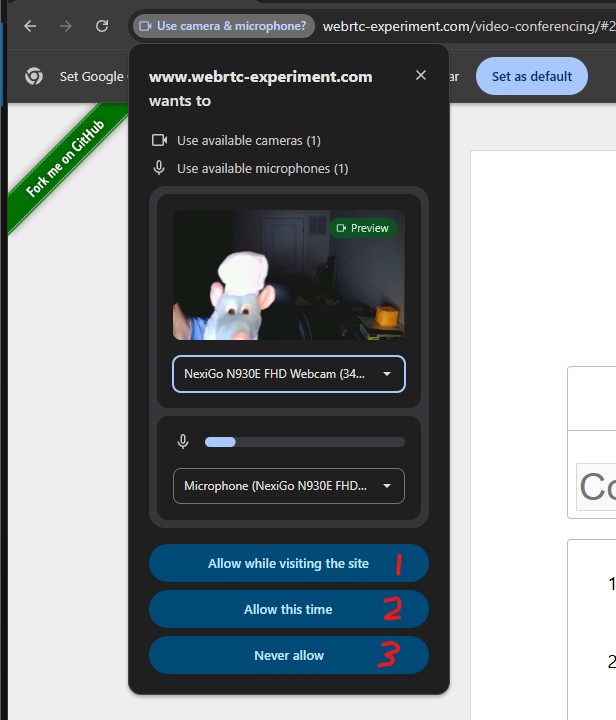
If you picked 1, “Allow while visiting this site”, the top-most prominent option, then the domain (in this case webrtc-experiments.com) can activate your camera and microphone any time you click a button on that domain… for quite a while.
Over the years, you have undoubtedly accumulated more than a handful of these “Auto allow mic/camera” authorizations and clicked through them. Sometimes (depending on the device) granting these permissions in perpetuity.
Additionally, some popular meeting software is also helpful during your initial account setup 5 years ago to have prompted you to “Auto-Join Meetings” when you click a meeting link matching that domain.
Do you see how this gets quite simple to “exploit”?
If you want to easily play around with seeing and learning to recognize the security prompts of various platforms, you can use https://www.webrtc-experiment.com/video-conferencing/
If I know you have used <popular meeting software> at some point in the past, I can stream audio/video to myself by simply getting you to click a disguised meeting invite link and you will auto-join it.
There’s no fancy hacking tools involved here. Just the passive listener using the official <popular meeting software> on the other end of the line.
But won’t I see that I’m on an audio/video call?
Well, no. Especially not if you’re a high profile individual. Cross-site scripting (XSS) is an extremely common exploit to find on sites, and the chances that a motivated attacker can find one on the same domain that you have previously authorized to access your camera/microphone is pretty high, at which point the attacker can just hide nearly all indications that your camera/mic are in use.
Here’s a public example from meeting platform Jitsi from ~6mo ago, just so you know I’m not making things up. This is a quite well known abuse of browser-based and native meeting software alike.
You said “nearly all” indications that camera/mic are in use?
You can absolutely listen in on wireless headphones via radio emissions. You can absolutely track someone using wirelss headphone radio emissions. You can absolutely hack and exploit software and hardware vulnerabilities in wireless headphones.
Or… you can get your target to click a link from anywhere in the world and wiretap them.
But wait, if they’re halfway across the world, what does that have to do with bluetooth?
Wireless headphones are wireless, so you aren’t wired to the device to see the literal only reliable indicator that your camera/microphone is active.
If you think that Android/iOS/MacOS/Windows/Ubuntu all implemented these visual indicators for when the camera/microphone are being accessed for no apparent reason, I have a bridge to sell you.
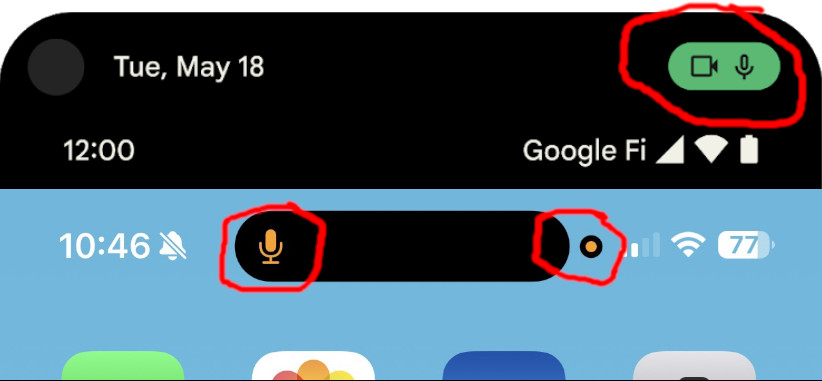
The truth is, these indicators exist for obvious reasons driven by real events, and stories about high profile individuals aren’t going to make the main news cycle. Instead they’re going to end up in various government guidance and in the photographed behaviors of public figures.
Now, go review the camera/mic permissions you’ve granted for various sites and apps over the years.
Sharing is caring!